ChordCodex ← chordcodex.com
User Manual

The ChordCodex manual.

Every feature, explained simply — open exactly the chapter you need. New to the app? Chapter 00 gets you playing in five minutes. Everything applies to iPhone and iPad alike.

Video tutorials — coming soon
The first batch is in production. Until then, every feature is covered in the manual below.
Contents
00
Start here
Your first five minutes
01
The basics
Library, demos, five key words
02
Jam
Pads, feels, key & tempo
03
Chord Factory
Build and shape any chord
04
Song
Sections, arrangement, undo
05
Feels
Strum · Comp · Arp · Gate
06
Drums
Sequencer, pads, kits
07
Bass
Chord-aware basslines
08
Share, import & export
Files, MIDI, WAV, charts
09
MIDI & settings
DAWs, Bluetooth, sync, sounds
10
Free vs Pro
What is included where
11
Troubleshooting
Quick fixes & FAQ
00

Start here

Your first five minutes, in three steps. Prefer watching? Chapter 01 is all video.

1

Open a demo

On the home screen, pick anything under STARTER PACKS. It's a finished example you can poke at — you can't break it.

2

Play

Tap the big pads. Each one is a chord. Tap near the top for soft, near the bottom for loud. That's the whole trick.

3

Make it yours

Change one thing — a strum feel, a chord, the key. The app saves your own copy automatically. Now watch the tours below.

01

The basics

How the app is organized, and where your music lives.
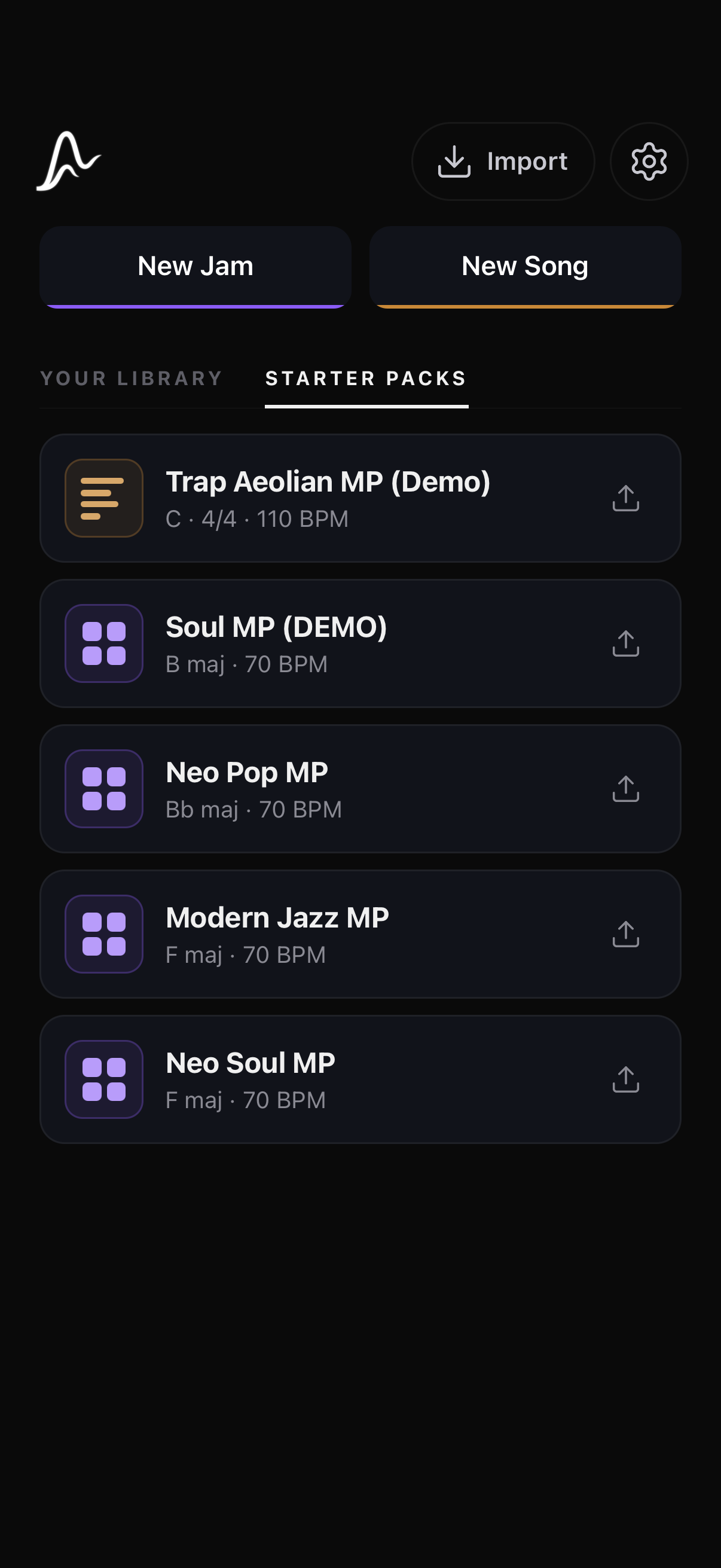
Home — your library & starter packs
Browse the basics · 5 topics

Home: your library & starter packs

The home screen is the front door to everything you make.

  • YOUR LIBRARY holds every jam and song you've created or imported.
  • STARTER PACKS are built-in demos — open one to see how it's put together.
  • The menu on any row: rename, export, duplicate, delete.

Demos stay pristine

Explore freely — you can't break a starter pack.

  • The moment you edit a demo, the app saves your own “(copy)” to the library and keeps editing that.
  • The original demo stays untouched in Starter Packs, forever available as a reference.
  • Works the same for demo jams and demo songs.

Two ways to work

Jam and Song are different rooms for different moods.

  • Jam — a pad grid for playing and exploring progressions live.
  • Song (Compose) — sections, arrangement, drums, bass, and export.
  • Both get their chords from the same Chord Factory.

Five words the app uses

Everything else in this manual builds on these.

WordWhat it means here
JamA grid of chord pads you play live. Loose, fast, for finding ideas.
SongA structured arrangement — sections in order, played by the transport.
SectionOne part of a song (Verse, Chorus…). Owns its chords, drums and bass.
FeelHow a chord is performed — strummed, comped, arpeggiated, or pulsed.
VoicingWhich exact piano keys a chord uses. Same chord, different color.

Guided tours

Each screen introduces itself the first time you open it.

  • Spotlight tours point out the controls, one at a time. Skip anytime.
  • Replay them all from Settings → Tips → Show all tips again.
  • Or turn tips off entirely with the master switch.
02

Jam — play first, think later

A grid of chord pads with pro strum feels. Everything is one tap from sound.
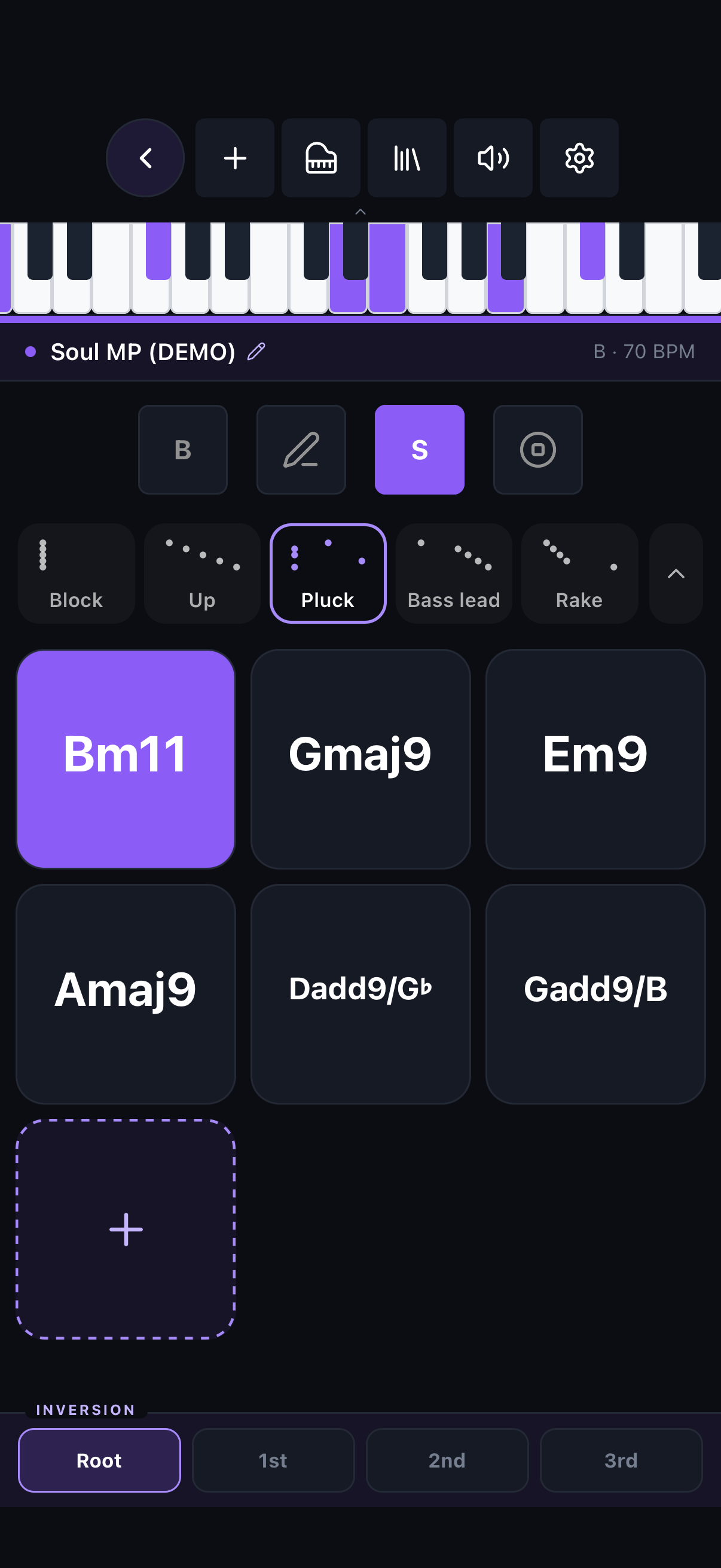
The Jam grid
The Jam grid
Open the Jam chapter · 4 topics

Pads & touch dynamics

The pads are velocity-sensitive by position.

  • Tap a pad to play its chord. Tap near the top for soft, near the bottom for loud.
  • Velocity locks at the moment you touch — sliding your finger won't retrigger.
  • Prefer consistency? Switch to a fixed velocity in Settings.

The control bar

Left to right, everything that shapes the session.

  • KEY CBPM 120Key & BPM — transpose the whole jam, shift its octave (±2), type a tempo or tap one in.
  • Edit — drag pads to reorder, rework a chord in the Factory, or delete it.
  • SSustain — each chord rings until you play the next.
  • Ableton Link — sync tempo with Link apps on your network.
  • Panic — silences everything instantly, and lights up by itself when a note is stuck ringing.
  • Mixer (top bar) — sound picker and keys/drums/bass/metronome levels. Long-press to mute everything.

Strum feels

The card row above the pads is your feel menu. Each card's dots are the strum itself — five voices, left to right in time:

Block
Up
Pluck
Roll up
Rake
  • Tap a card to switch instantly. Block hits all five voices together; Up sweeps evenly low→high; Pluck lets one string ring late; Roll up accelerates into the top; Rake drags then lands clean.
  • Tap the chevron for the full library and deep controls: speed (with note-value snaps), direction, curve, humanize, velocity ramp.
  • Long-press a card to pin any feel — including ones you've made — to that slot.

Adding & editing chords

The grid grows with you.

  • Tap the pad to open the Chord Factory and add chords.
  • In edit mode, tap a pad's to reopen it in the Factory pre-loaded — Done swaps it in place.
  • Jams save automatically as you play.
Jam also sends MIDI while you play — see MIDI & Settings.
03

The Chord Factory

Every chord in the app is built here. No theory required — pick a root and a quality, and the Factory does the naming.
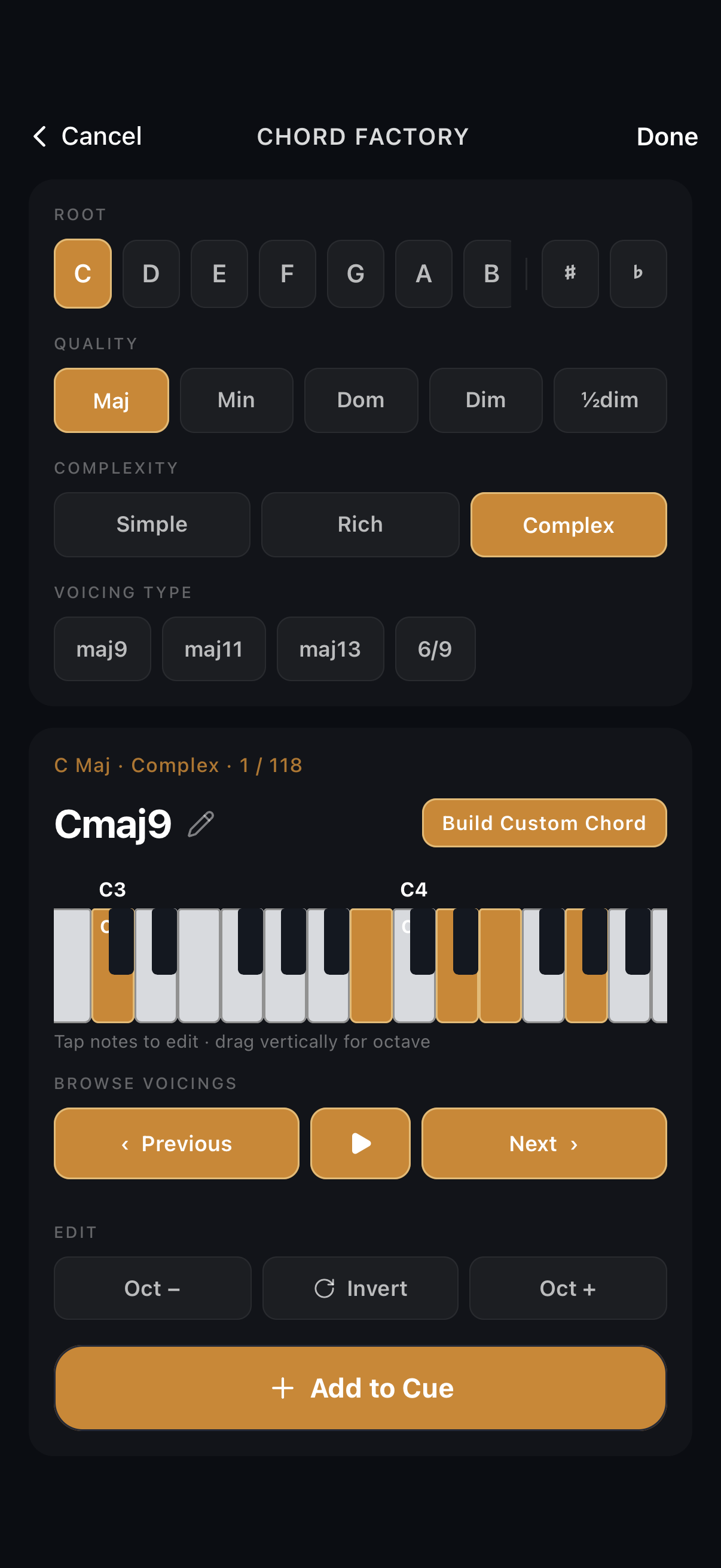
The Chord Factory
The Chord Factory
Open the Chord Factory chapter · 4 topics

Build a chord

Three choices and you're playing it.

  1. Pick a root — with ♯/♭ accidentals.
  2. Pick a quality: major, minor, 7ths, sus, and beyond.
  3. Set complexity — it widens the voicing pool from simple to adventurous.
  4. Swipe through voicings; each plays as it appears.

The tappable piano

A full C1–B6 keyboard — scroll to reach any octave, always.

  • Tap any key to add or remove that note.
  • Drag a lit key up or down to move just that note an octave.
  • The chord name updates live — the Factory recognizes what you build, even altered and slash chords.

Cue several, commit once

Collect a progression without leaving the screen.

  1. Add drops the current chord into the cue bar.
  2. Keep building — the cue collects as many as you like.
  3. Done sends the whole cue to your Jam or Song at once.

Your voicing is sacred

What you build is what plays, everywhere.

  • The exact notes you commit are stored on the pad or chord — note for note.
  • Jam and Song play it as built; nothing re-voices behind your back.
  • Transposing moves it. It never rewrites it.
04

Song — from idea to arrangement

Sections, chords, and a feel for each. Compose is where a jam becomes a song.
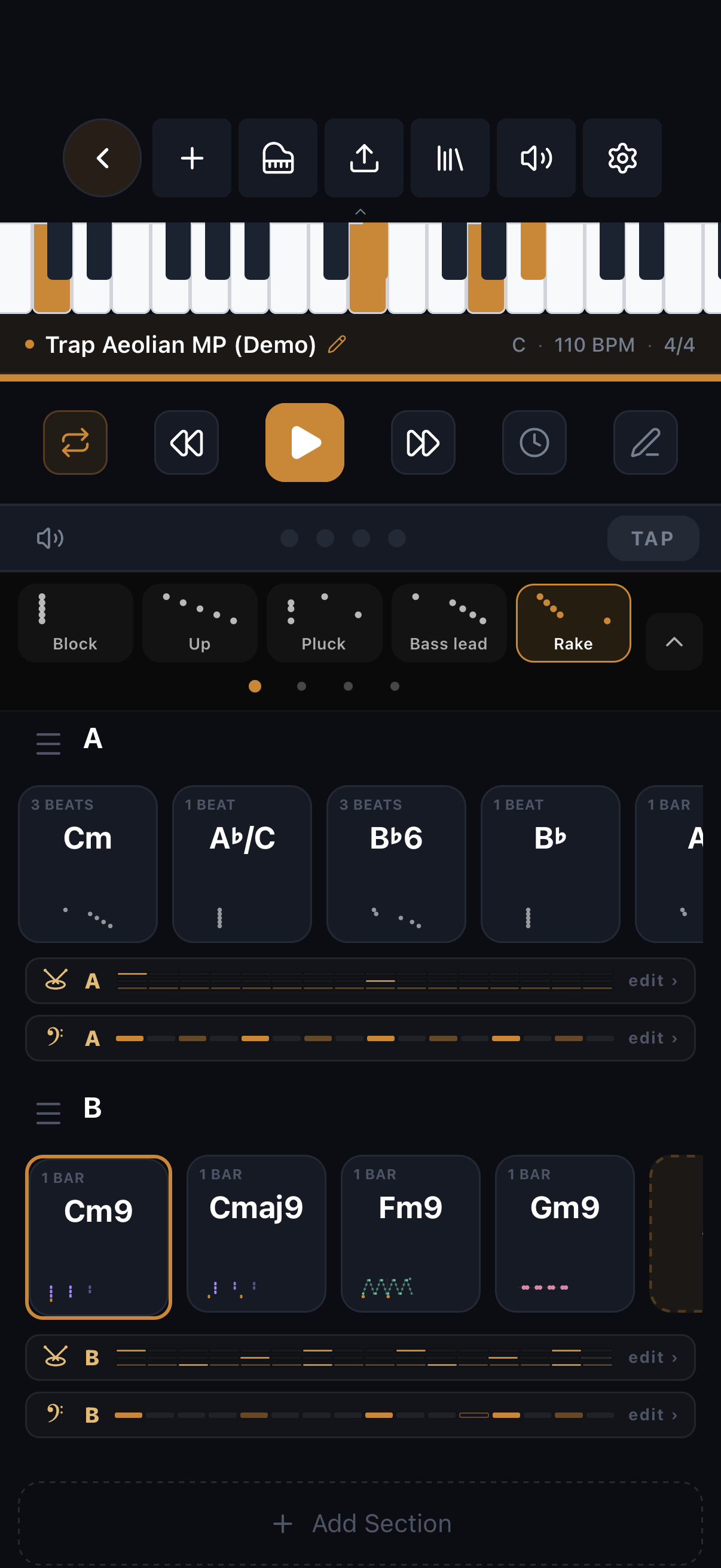
A song — sections, chords, transport
Open the Song chapter · 4 topics

Sections

A song is a list of sections; each owns its chords, drums and bass.

  • Add sections — Verse, Chorus, or your own names — and reorder or duplicate them.
  • Set a repeat count (1×–4×) on the section header; playback and MIDI export honor it seamlessly.
  • Collapse sections you're not working on — the collapsed card shows status icons and highlights the sounding chord during playback.

The chord inspector

Tap any chord to edit it in place — no separate editor screens.

  • Set the chord's length (it snaps musically to your meter) and velocity.
  • Give it its own feel, overriding the section's — or a one-off quick strum.
  • The menu: save the feel as a preset, copy/paste feel & length between chords.
  • Rework the harmony itself via Edit in Factory.

Meter, key & tempo

Song-level musical settings, changeable at any time.

  • Any common or odd meter — 4/4, 3/4, 5/4, 5/8, 6/8, 7/8, 9/8, 12/8.
  • Changing meter re-bars your content intelligently — presets and patterns follow.
  • Type an exact BPM, and transpose the whole song's key at once.

Density transform & undo

Big moves, safely.

  • Density — try Rich or Complex: style-aware re-voicings of your progression. Original restores your exact chords anytime.
  • Undo/redo — 20 steps in each direction, covering every edit: chords, sections, feels, drums.
  • First edit of a demo song forks a copy — and undoing past that fork restores the pristine demo.
During playback, every groove restarts cleanly at each chord change — arps never resume mid-run.
05

Feels — how chords actually play

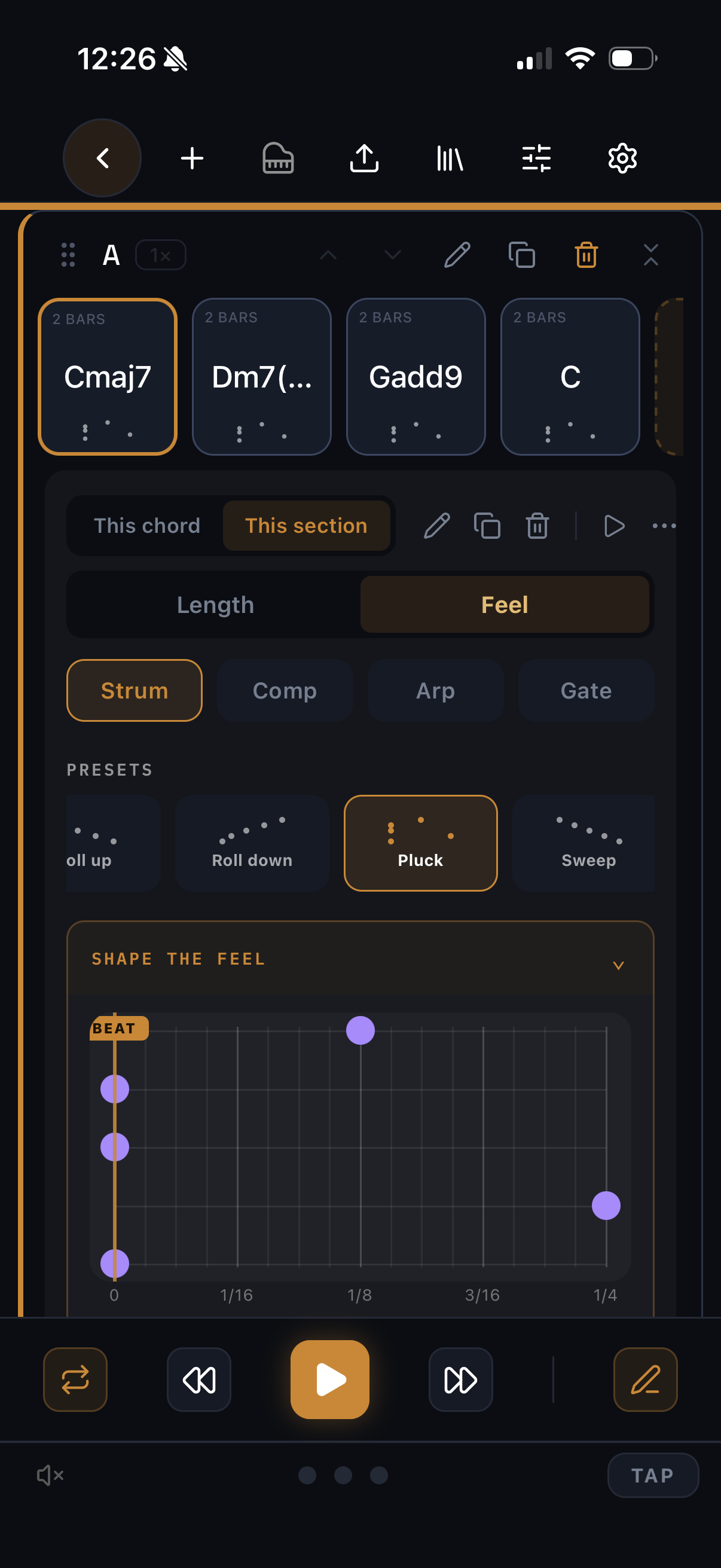
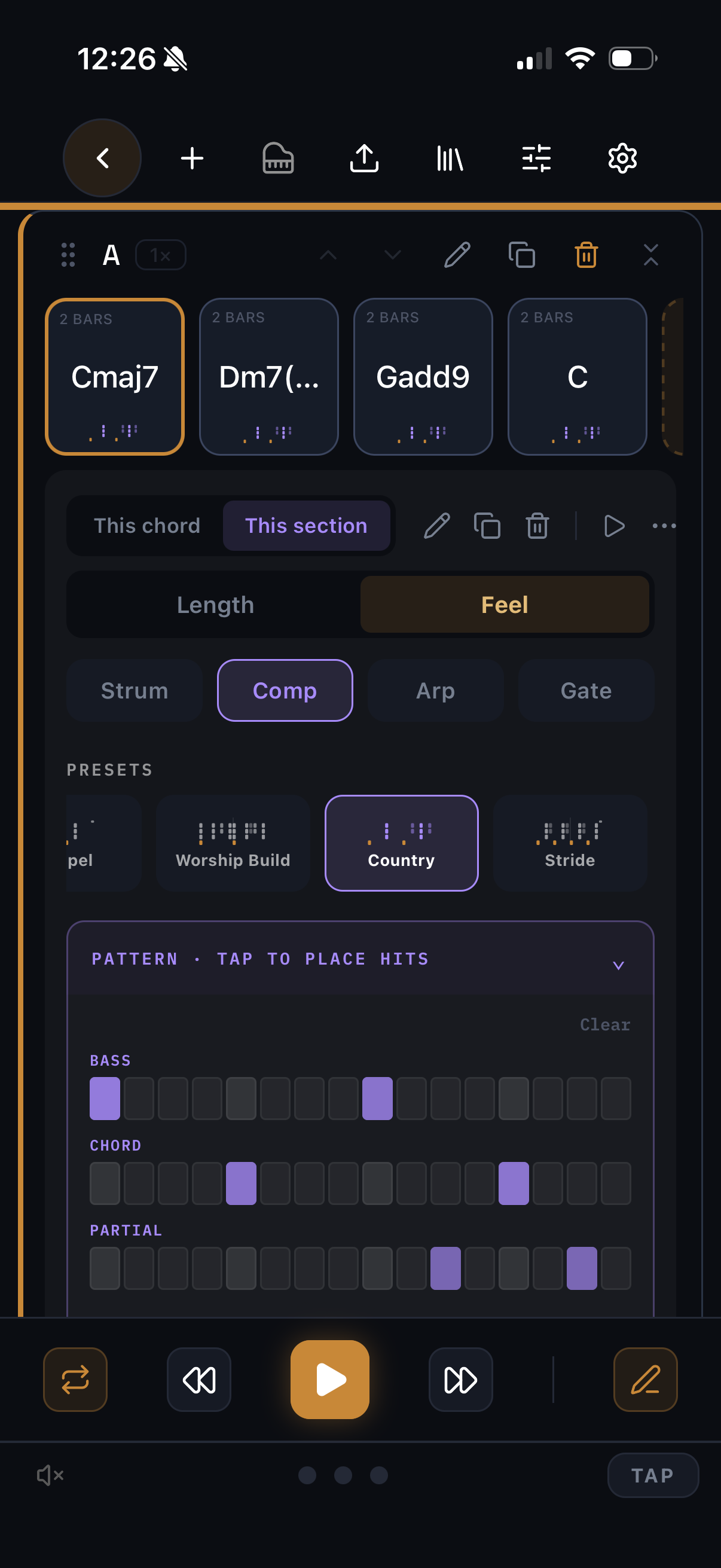
A feel is how a chord is performed. Pick one per section, give any single chord its own, or design yours from scratch.
Strum
Strum
Comp
Comp
Arp
Arp
Gate
Gate
Open the Feels chapter · 3 topics
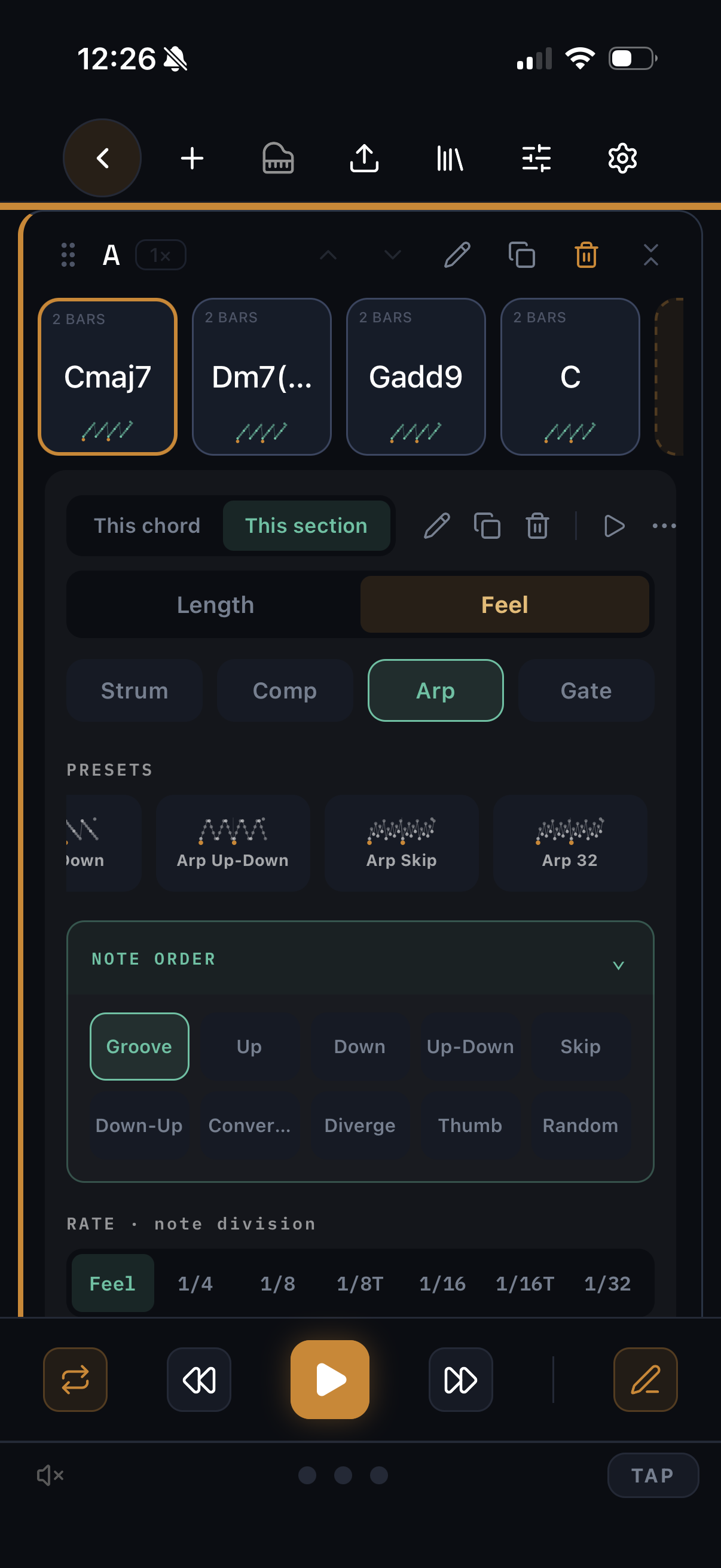
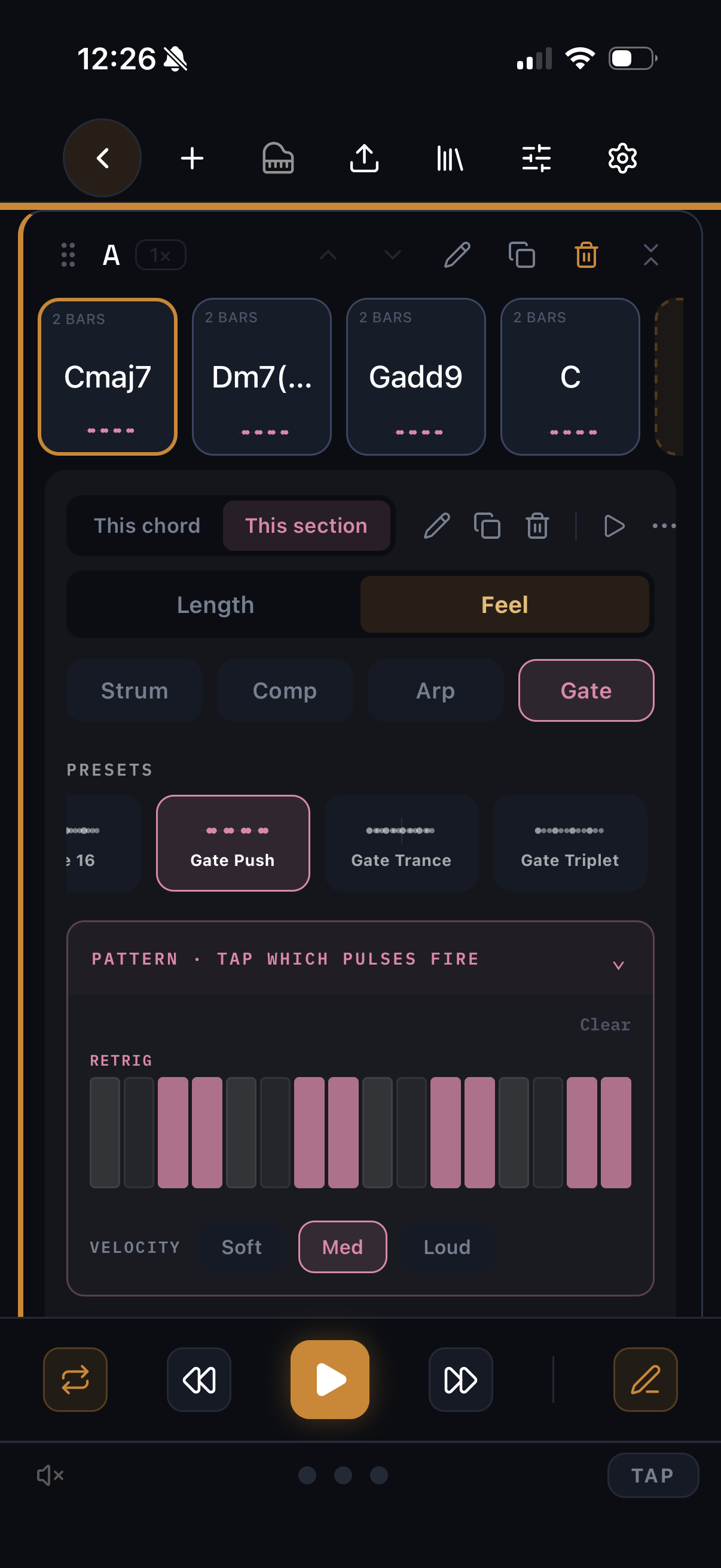
FeelWhat it doesKey controls
STRUMGuitar-style rolls across the voicingSpeed (note-value snaps), direction, curve, humanize, velocity ramp
COMPPiano comping with two-hand voicing and touchGroove pattern, dynamics, strike length, per-strike shape
ARPArpeggios that follow each chordMode, octave range, rate, note length — plus bass modes (Hold / Hold + 5th / In arp)
GATERhythmic pulsing of the held chordPattern, gate length — long gates turn legato

Expressive controls

Every feel has an “Edit feel” panel where the character lives.

  • Dynamics — how hard the pattern plays, with natural variation.
  • Humanize — subtle timing looseness, tempo-aware.
  • Comp balances its voices like a real hand — the top note carries.

Custom grooves & presets

When the built-ins aren't yours yet.

  • Design comp/arp patterns in the custom groove editor; they join your library.
  • Save any tweaked feel as a preset; pin favorites to the quick row.
  • Feels travel inside shared song files, so collaborators hear exactly what you hear.
06

Drums, per section

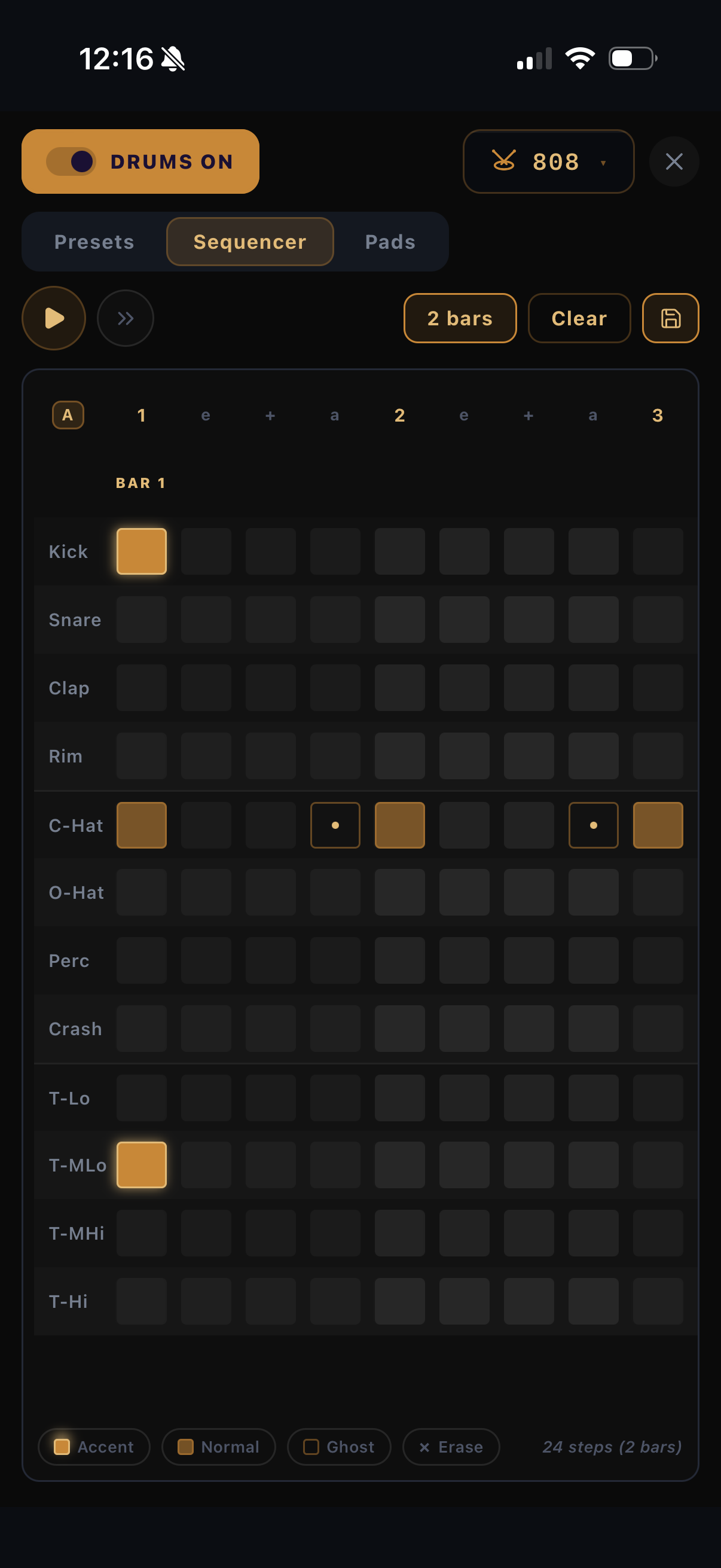
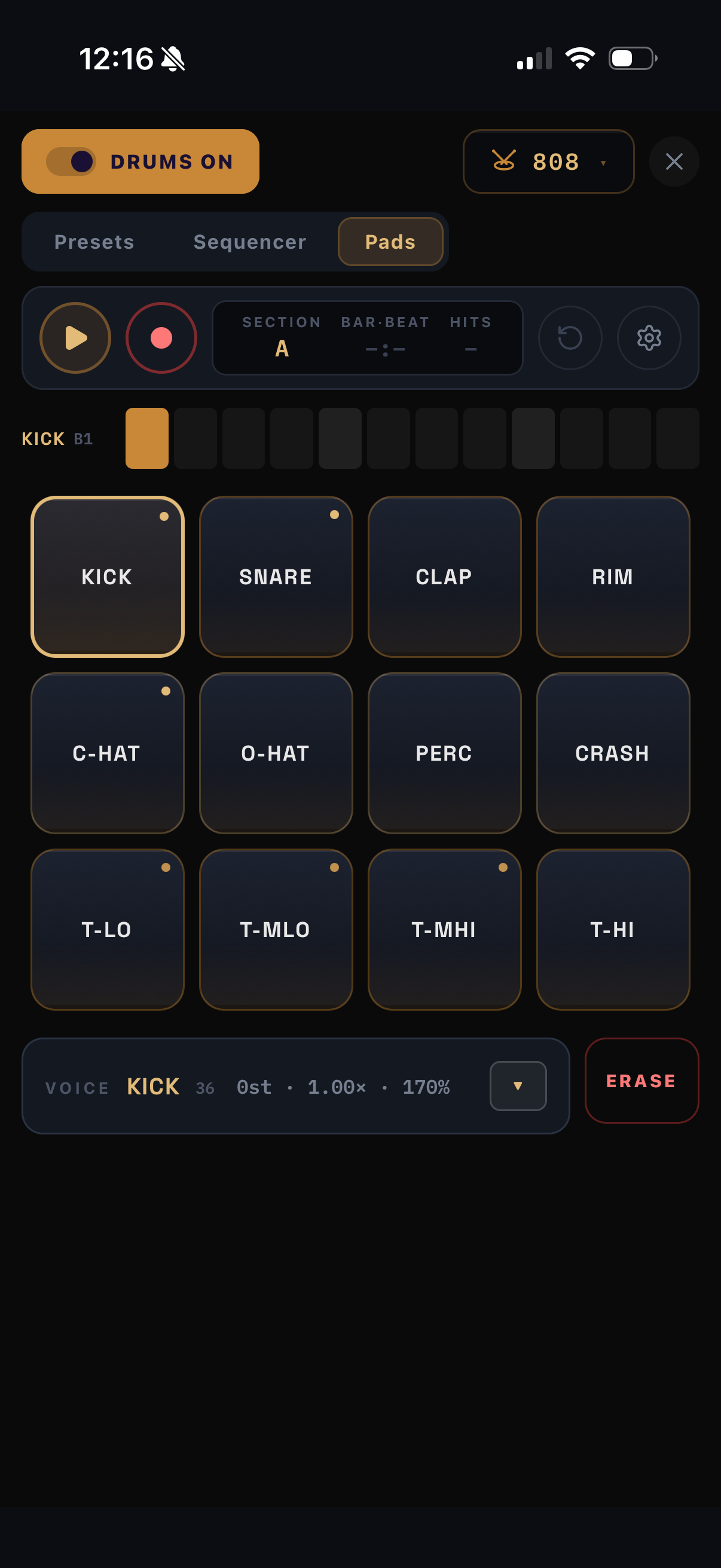
A drum machine built into your song. Each section has its own beat; the kit and drum tuning belong to the whole song.
Step sequencer
Step sequencer
Pads — finger drumming
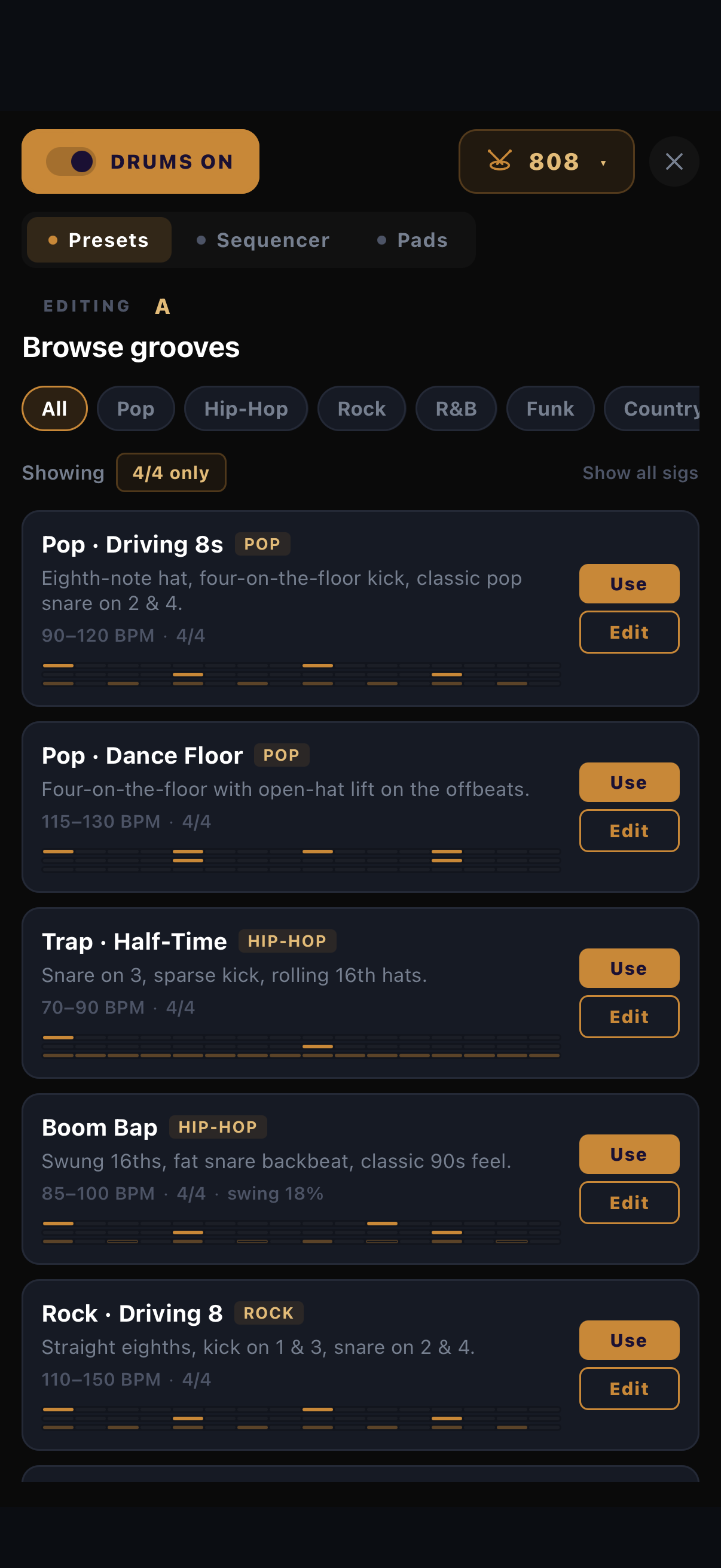
90+ pattern presets
90+ pattern presets
Open the Drums chapter · 4 topics

Sequencer

A step grid that is always exactly one bar of your meter.

  • Tap Add drums on any section, then tap cells to place hits.
  • Tapping cycles the hit: normal → accent → ghost → off. Or pick a tier brush and paint.
  • Swing slides the off-beats; odd meters get correctly-shaped grids (5/8, 7/8, 12/8…).
  • Start from 90+ presets across genres, then make them yours.

Pads & recording

An MPC-style surface for finger drumming.

  • Square pads, laid out for two thumbs. Hit them — they're live instantly.
  • REC captures a take into the pattern. Set quantize (off / 1/16 / 1/8, half or full strength), overdub or replace, count-in, and click.
  • Low-strength quantize keeps your human timing — the loose milliseconds are stored per hit.
  • Hold ERASE and press a pad to strip that drum's hits.

Kits & per-drum shaping

This is where songs get their own drum sound.

  • Choose 808 or 909 per song.
  • Long-press any pad for that drum's voice panel: Tune (±12 st), Decay, Snap, Volume, Tone.
  • Tweaks are saved with the song — every song can have its own snare pitch — and they travel inside shared files.

Your patterns, reusable

Good grooves shouldn't be trapped in one song.

  • Save names the current pattern into your preset bank, usable in any song.
  • Share patterns as files; they open in a friend's ChordCodex.
  • Auditioning a preset plays it in place of that section's drums — never layered on top.
07

Bass that knows your chords

A per-section bass sequencer that always lands on the right notes.
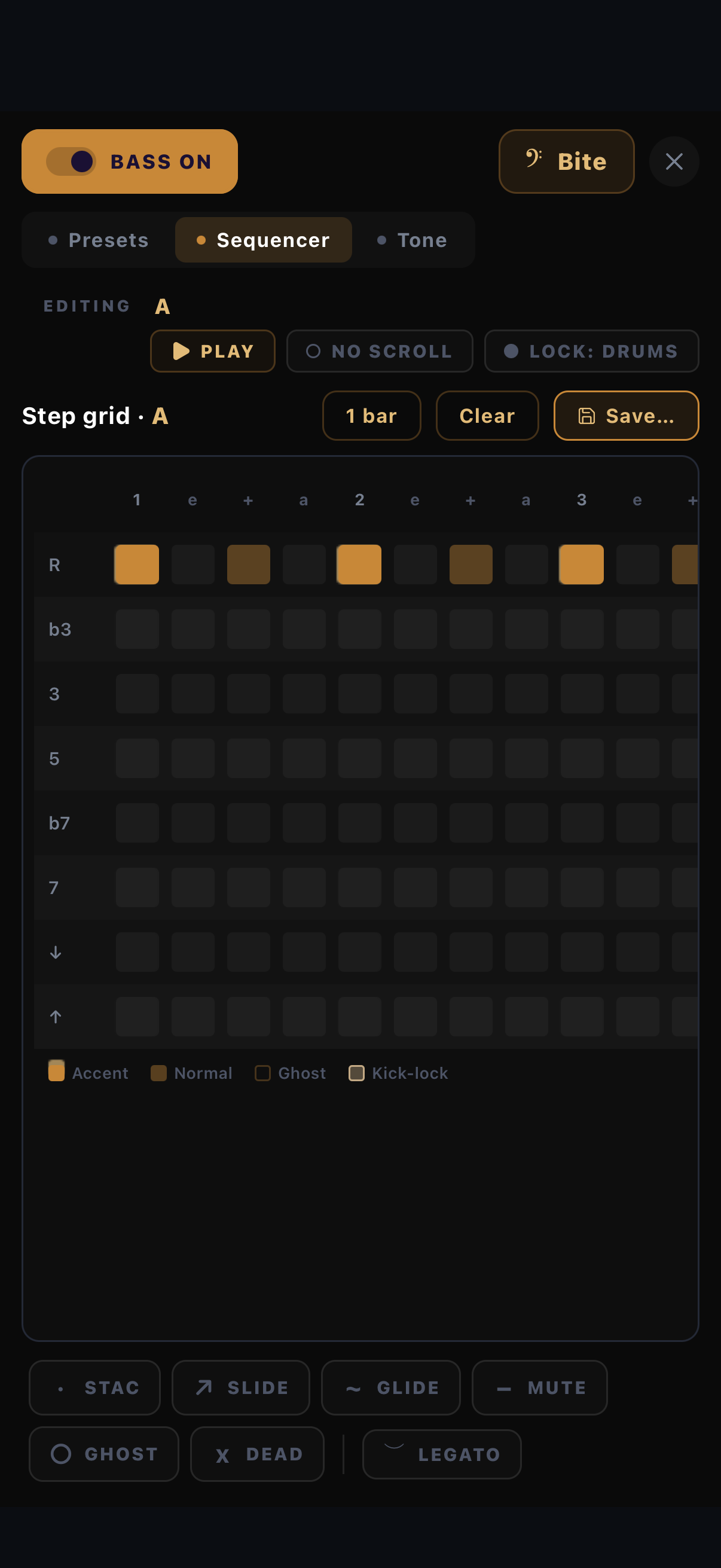
Bass sequencer
Bass sequencer
Bass presets
Bass presets
Open the Bass chapter · 3 topics

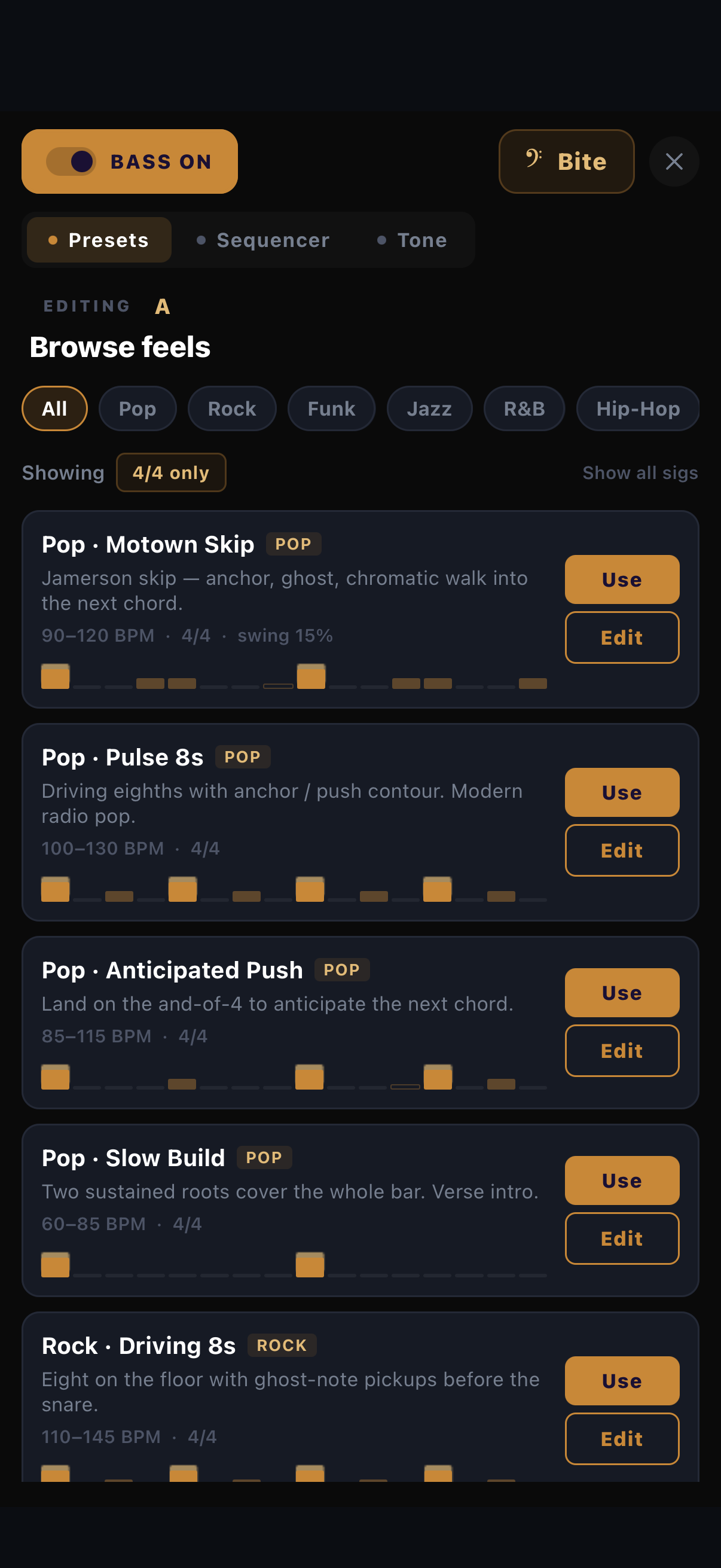
Write a bassline

Steps snap to chord tones, so wrong notes are hard to hit.

  • Tap Add bass on a section; place steps on the grid.
  • Steps are chord-aware — roots, fifths, octaves follow the harmony as it changes.
  • Start from 50+ presets spanning styles and meters.

Lock to drums

The oldest trick in rhythm sections, automated.

  • Flip to drums lock and the bass follows your kick pattern.
  • Optional boom-chick: snare hits answer with the fifth.
  • Swing follows the drums automatically while locked.

Shape the tone

The bass has its own voice controls, like the drums.

  • Open the tone editor for tune, decay, attack, volume and tone controls per bass sound.
  • Bass level rides its own volume slider — balance it against keys and drums in the audio menu.
08

Share, import & export

From your couch to their studio — songs travel as files. No accounts, no uploads.
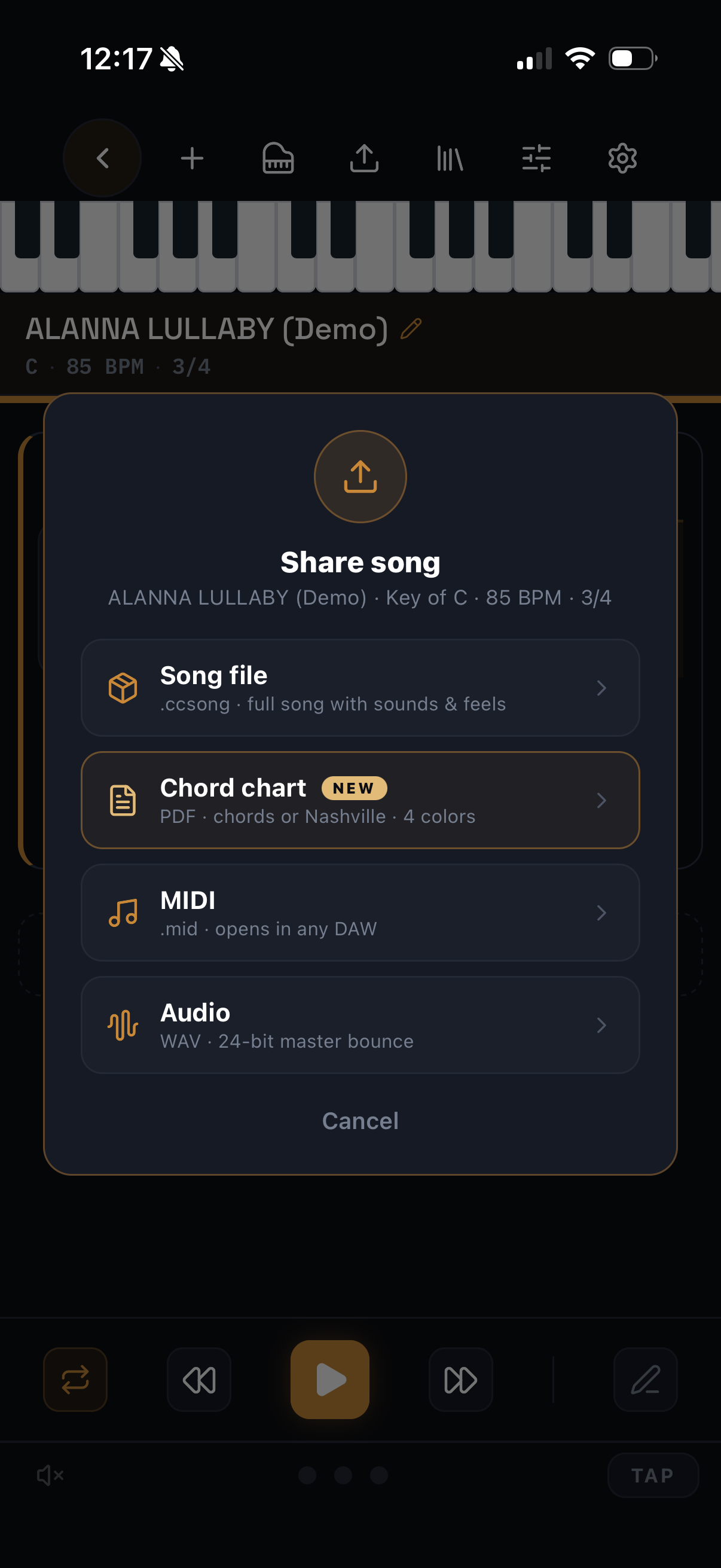
The share menu
The share menu
Open the Sharing chapter · 3 topics

ChordCodex files — always free

One file carries the whole song.

  • Share a song as a .ccsong (jams: .ccjam) via AirDrop, Messages, Files…
  • It carries chords, sections, feels, drum patterns, drum shaping, bass — everything.
  • Recipients tap the file and it opens straight into ChordCodex. Sharing and importing these is free for everyone.

Into your DAW

Three formats out, depending on the destination.

  • MIDI — the full arrangement as a standard multi-track MIDI file: chords, drums, bass, with section repeats unrolled.
  • Audio (WAV) — a 24-bit bounce of the whole song, one bar of silent lead-in for easy alignment.
  • Chord chart (PDF) — section cards, rehearsal letters, beat ticks; chord names or Nashville numbers; four print palettes.
Drum patterns can also be shared on their own as preset files — great for trading grooves.

Bringing things in

Import is just as file-based as sharing.

  • ChordCodex files — tap a .ccsong or .ccjam anywhere on your device and it opens in the app.
  • Ripchord presets.rpc files import as ready-to-play jams.
  • MIDI files — import a .mid and it becomes an editable song.
09

MIDI, sync & settings

ChordCodex plays into GarageBand, Logic, AUM — anything that listens to MIDI.

Open the MIDI chapter · 4 topics

Play into another app

Zero setup on the same device.

  1. ChordCodex publishes a virtual MIDI port automatically — nothing to enable.
  2. In your DAW, record-arm a software instrument track.
  3. Play ChordCodex — your pads now drive their instruments.
  4. Need a specific channel? Set it in Settings → MIDI. A Test button confirms the route.

Hardware & sync

Bluetooth gear, your Mac, and shared tempo.

  • Bluetooth MIDI — pair controllers, or make ChordCodex discoverable to other devices.
  • USB to Mac — plug in and ChordCodex appears as a MIDI device in your DAW.
  • Ableton Link — lock tempo with every Link app on your network, from the link icon in Jam.
  • Optionally send MIDI clock so external gear follows your BPM.

Sound & mix

The built-in instrument and the audio menu.

  • Pick from 8 built-in sounds — pianos, EPs, pads, organ — in the sound picker.
  • Or import your own instruments — SoundFont (.sf2) files load right into the picker.
  • Balance keys / drums / bass / metronome volumes behind the mixer button; master volume rides on top.
  • Unplugging headphones pauses playback instead of blasting the room.

Velocity & behavior

Settings that change how the pads feel.

  • Dynamic velocity — pads respond to touch position, within a min/max range you set.
  • Fixed velocity — every hit identical, for consistent takes.
  • Manual chord advance (Song) — step through chords yourself instead of the clock.
  • Tips — replay every guided tour, or turn them off.
10

Free vs Pro

Everything you need to write and share is free. Pro is for when you're ready to take stems to a DAW.

See what is in each · 2 topics

Free — the whole studio

  • Jam, Chord Factory, Song mode, drums, bass, feels.
  • Unlimited saving to your library.
  • Share and import ChordCodex files — the collaboration loop is never paywalled.

Pro — publish-grade output

  • The full chord complexity range and premium feels.
  • WAV, MIDI and PDF chart export, plus MIDI file import.
  • One subscription — monthly, annual, or a one-time lifetime purchase. 7-day free trial.
11

Troubleshooting & FAQ

The five questions that cover almost everything.

Open troubleshooting · 6 topics

"I don't hear anything"

  • Check the mute — long-press the mixer button toggles it.
  • Open the mixer and check master and keys volumes.
  • On iPhone, check the silent switch and volume rocker.

"A note won't stop ringing"

  • That's exactly what the ⊘ panic button is for — it even lights up on its own when this happens.
  • One tap silences everything; your jam is untouched.

"Playback stopped when I unplugged my headphones"

  • That's deliberate — it keeps the app from suddenly playing out loud. Press play to continue.

"My DAW doesn't see ChordCodex"

  • Open Settings → MIDI and use the Test button to confirm notes are flowing.
  • Check that your DAW listens on the same channel.
  • For Bluetooth gear, re-pair from the Bluetooth MIDI panel.

"Editing a demo made a copy"

  • By design — demos stay pristine as references, and your copy is yours to shape.
  • Find it in YOUR LIBRARY with "(copy)" in the name. Rename it whenever.

Still stuck?

  • Write to nuvesnd@gmail.com — include what you tapped and what you expected, and we'll sort it out.